![federal-compass-white-icon-1.png]](https://knowledge.federalcompass.com/hs-fs/hubfs/federal-compass-white-icon-1.png?height=40&name=federal-compass-white-icon-1.png)
Who This Helps
- BD and capture teams managing teaming strategies per opportunity
- Organizations working with multiple partners across pursuits
- Teams looking to centralize collaboration and partner engagement
Using Connected Partners on Opportunities
Once a partner accepts your invitation, they become part of your network and are available for collaboration.
Instead of starting from scratch for each opportunity, you can:
- Share opportunities with partners you’ve already connected with
- Coordinate teaming efforts more effectively
- Track partner involvement across pursuits
Add Partners to an Opportunity
- Go to Opportunities → Opportunity Search
- Open an opportunity you are interested in
- In the Partners section (left-hand side), click Add Partner
- Search for and select an existing partner
Once added, the partner will appear in the list.
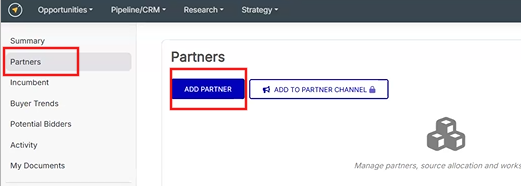
You can add multiple partners based on your teaming needs.
Share an Opportunity
Adding a partner does not start collaboration; you must share the opportunity.
- Click Share Opportunity
- Select Share with Partners
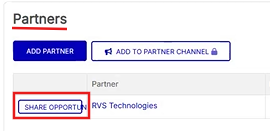
Once shared:
- Status updated to Shared
- The partner is notified and can access the opportunity
Track Partner Engagement
After sharing, partners can review and respond:
- On their side:
- Go to Opportunities → Partner Opportunities
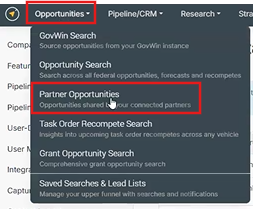
- Select Interested or Not Interested
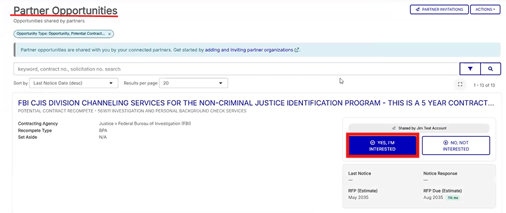
- Go to Opportunities → Partner Opportunities
- On your side:
- Status updates
Partner Status
Status appears next to the partner name:
- Not Connected → Not in your network
- Shared → Opportunity sent
- Interest → Partner confirmed interest
- Not Interested → Partner denied interest
Managed Partner Details
Once a partner is interested, you can define their role:
- Relationship Type (prime, sub, supplier)
- FTE
- Work Share

Has Teaming Agreement and Clearance cannot be edited here. These are set at the organization level.
View Partner Activity
You can view all opportunities shared with a specific partner by navigating to their organization record.
- Go to the Organizations (Pipeline/CRM) page
- Select the partner you want to view
- Open their record to see:
- Partner details
- All opportunities that have been shared with them
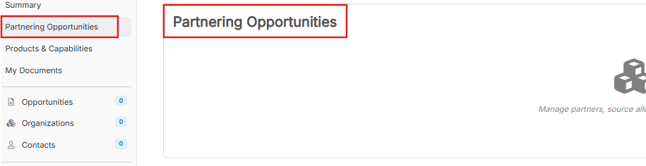
This allows you to quickly understand your engagement with a partner across multiple pursuits without needing to search for each opportunity individually.
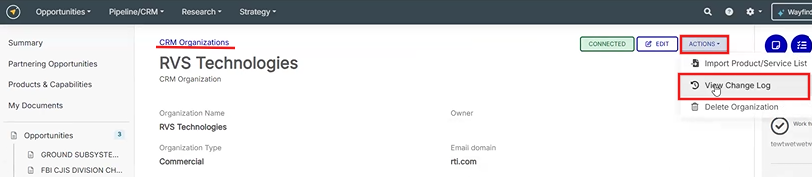
Track Data Changes
Use the Change Log to:
- See who updated data
- View when changes were made
Important Notes
- Partners must be connected before sharing
- Adding = sharing
- Partner responses must be completed on their side
Best Practices
- Add partners early
- Share opportunities quickly
- Monitor responses and follow up
- Define roles once interest is confirmed
Use Cases
- Build teaming strategies per opportunity
- Track partner engagement across pursuits
- Improve coordination across teams
Conclusion
By managing partners directly within opportunities, your team can move faster, stay aligned, and collaborate more effectively all within one platform.
Need Additional Help?
If you have any questions, please reach out to the CSM team for further assistance, support@federalcompass.com.